


Overview
At Tilburg Science Hub, we believe in the power of collaboration and collective knowledge. Our platform thrives on the contributions of individuals like you who are passionate about advancing the frontiers of science and academia.
If you've added valuable content to Tilburg Science Hub and want to claim your rightful place as a contributor, you're in the right place. Becoming a recognized contributor not only acknowledges your significant role in our community but also allows you to showcase your expertise to a global audience.
Adding yourself as a contributor is a straightforward process that celebrates your dedication to open knowledge sharing. It's your chance to leave a mark on the world of academia and to inspire others to follow in your footsteps.
In this guide, we'll walk you through the simple steps to add yourself as a contributor, ensuring that your invaluable contributions are acknowledged and appreciated. Let's take the next step on this exciting journey of knowledge creation and dissemination together.
Add a Contributor
To add yourself as a contributor, you need to start of by creating an .md for yourself in the content/contributors folder. The structure for your .md file is shown below with an explanation for each number below the images and the output result for a contributor page. For the name of the .md file you can use your firstname, combined with your lastname (firstname_lastname.md).
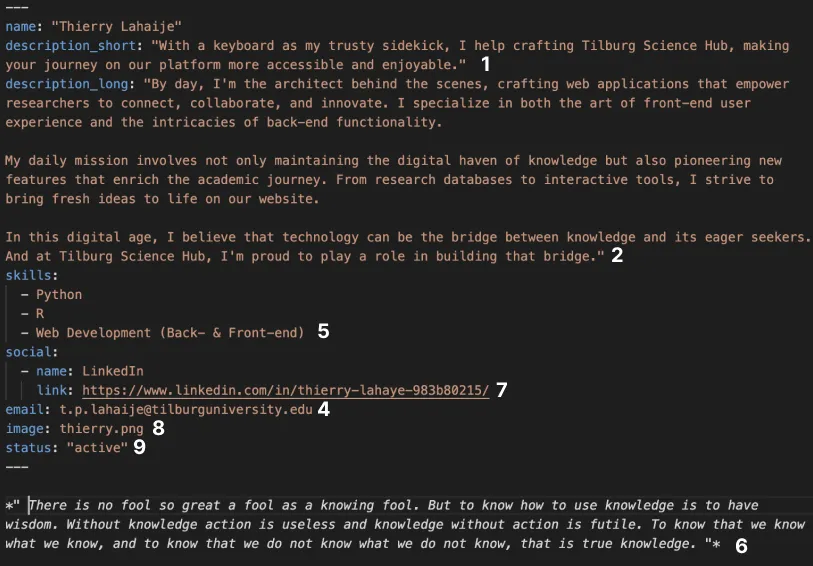
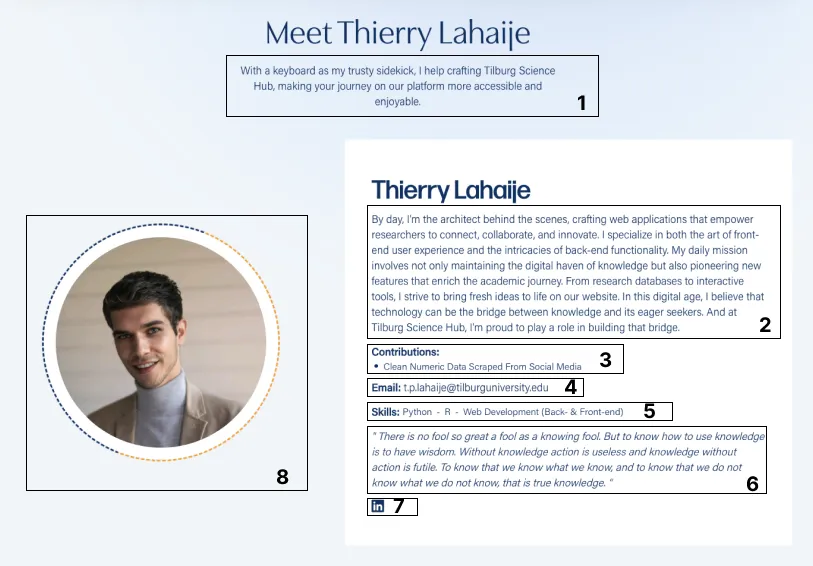
Explanation:
- description_short: This description will be displayed on the list page and on top of the contributor page.
- description_long: This can be seen as your "About me" section. Tell users about yourselve here.
- contributions: The contributions are automatically added. Just make sure that the all articles made by you contain the "author" parameter, containing your name. Your name should exactly be the same as the name given in your contributors' .md file
- emailadres: If you want, you can add your emailadres so that people can contact you.
- skills: Add the skills of your choice to display.
- free text: If you want to add some extra free text, you can add content to the .md file.
- social: Here you can add your Socials. For each social, add the name and the path of your profile. Currently, we allow Facebook, Twitter & LinkedIn.
- user image: first add your image to the folder 'themes/tilburg/static/img/contributors'. After you did this, add the name of your image to the image parameter (e.g. image: example.png).
- status: This status indicates whether you are an active contributor or an alumni. For this parameter, choose "active" or "alumni".